共享MacOS
共享MacOS
环境隔离
开启远程登陆功能,创建用户,设置密码 sudo sysadminctl -addUser <username> -password -
通过ssh key登陆
1
2
3
4
5
6
7
8
9
10
11
12
13
14
15
16
17
ssh-keygen -t ed25519 -C "ur email"
ssh-copy-id -i ~/.ssh/xxx.pub -p 10010 username@ip

# 在本地的 ~/.ssh/config 中配置连接信息

Host remote
  HostName ip
  User username
  Port port
  IdentityFile /path/to/keyfile
  ServerAliveInterval 60
  ServerAliveCountMax 30
  TCPKeepAlive yes


# 之后ssh登陆
ssh remote
- xcode 不要使用 xcode-select 指定默认xcode版本,在 ~/.zshrc 中设置 export DEVELOPER_DIR=/Applications/Xcode.app/Contents/Developer/ 选定自己的xcode,用 xcode-select -p 打印当前生效的xcode路径
- java
1
2
  /usr/libexec/java_home -V
  brew list --versions | grep -E 'jdk|java|openjdk|temurin|zulu'
- gradle 默认路径就是 ~/.gradle ,是按用户隔离的
- /Application 如果应用在其他用户不能访问,递归修改赋所有用户读和执行
sudo chmod -R a+rX /Applications/DevEco-Studio.app
bore开放端口
使用公共实例简单尝试
1
2
3
4
brew install bore-cli
bore local 22 --to bore.pub

ssh username@bore.pub -p xxx
配rust
1
2
3
4
5
6
7
8
9
10
11
12
13
14
15
16
# rustup 换源
export RUSTUP_DIST_SERVER=https://mirrors.huaweicloud.com/rustup/
export RUSTUP_UPDATE_ROOT=https://mirrors.huaweicloud.com/rustup/rustup/
curl https://sh.rustup.rs -sSf | sh
. "$HOME/.cargo/env"

# cargo换源
mkdir -vp ${CARGO_HOME:-$HOME/.cargo}

cat << EOF | tee -a ${CARGO_HOME:-$HOME/.cargo}/config.toml
[source.crates-io]
replace-with = 'mirror'

[source.mirror]
registry = "https://mirrors.tuna.tsinghua.edu.cn/git/crates.io-index.git"
EOF
自建bore服务器(debian/ubuntu)
1
2
cargo install bore-cli
bore server # 简单看到启动停掉就行,下一步再详细配
修改下面的ExecStart
ExecStart=/root/.cargo/bin/bore server –min-port [低位端口] –max-port [高位端口] –secret [随机密码]
/etc/systemd/system/bore.service
1
2
3
4
5
6
7
8
9
10
11
12
13
14
15
16
17
[Unit]
Description=Bore server
After=network-online.target
Wants=network-online.target
StartLimitBurst=5
StartLimitIntervalSec=300

[Service]
Type=simple
WorkingDirectory=/root
ExecStart=
Restart=on-failure
RestartSec=10
LimitNOFILE=65536

[Install]
WantedBy=multi-user.target
1
2
3
4
5
6
7
8
9
10
11
12
13
14
15
16
# Allow port 7835 (bore default control port)
sudo ufw allow 7835/tcp

# Allow port range (bore tunnel ports)
sudo ufw allow [低位端口]:[高位端口]/tcp

# Enable UFW if not already enabled
sudo ufw enable

# Check status
sudo ufw status

systemctl daemon-reload; systemctl restart bore; systemctl enable bore

systemctl status bore
journalctl -xeu bore.service
MacOS plist
/Library/LaunchDaemons/com.bore.local.plist
1
2
3
4
5
6
7
8
9
10
11
12
13
14
15
16
17
18
19
20
21
22
23
24
25
26
27
28
29
30
31
32
33
34
35
36
<?xml version="1.0" encoding="UTF-8"?>
<!DOCTYPE plist PUBLIC "-//Apple//DTD PLIST 1.0//EN" "http://www.apple.com/DTDs/PropertyList-1.0.dtd">
<plist version="1.0">
<dict>
    <key>Label</key>
    <string>com.bore.local</string>

    <key>ProgramArguments</key>
    <array>
        <string>/opt/homebrew/bin/bore</string>
        <string>local</string>
        <string>22</string>
        <string>--to</string>
        <string>[服务器地址]</string>
        <string>-s</string>
        <string>[连接密码]</string>
        <string>--port</string>
        <string>[连接到服务器的端口,不设是随机的]</string>
    </array>

    <key>RunAtLoad</key>
    <true/>

    <key>KeepAlive</key>
    <true/>

    <key>ThrottleInterval</key>
    <integer>10</integer>

    <key>StandardOutPath</key>
    <string>/var/log/bore-local.log</string>

    <key>StandardErrorPath</key>
    <string>/var/log/bore-local.log</string>
</dict>
</plist>
1
2
3
4
5
6
7
8
9
10
11
12
13
14
15
16
17
18
19
# Set correct permissions
sudo chown root:wheel /Library/LaunchDaemons/com.bore.local.plist
sudo chmod 644 /Library/LaunchDaemons/com.bore.local.plist

# Load and start the service
sudo launchctl load /Library/LaunchDaemons/com.bore.local.plist

# 前面的数字是pid,如果是0是没在运行
sudo launchctl list | grep bore

# View logs
tail -f /var/log/bore-local.log

# 重启
sudo launchctl bootout system /Library/LaunchDaemons/com.bore.local.plist
sudo launchctl bootstrap system /Library/LaunchDaemons/com.bore.local.plist

# 检查plist格式
plutil -lint /Library/LaunchDaemons/com.bore.local.plist
此外,如果bore的对端在国外可能被走代理,代理只要有波动就会导致所有ssh断掉。可以配置bore的7835端口不走代理 https://www.clashverge.dev/guide/rules.html#_3
开发工具
idea
- jetbrains gateway 只支持远程linux
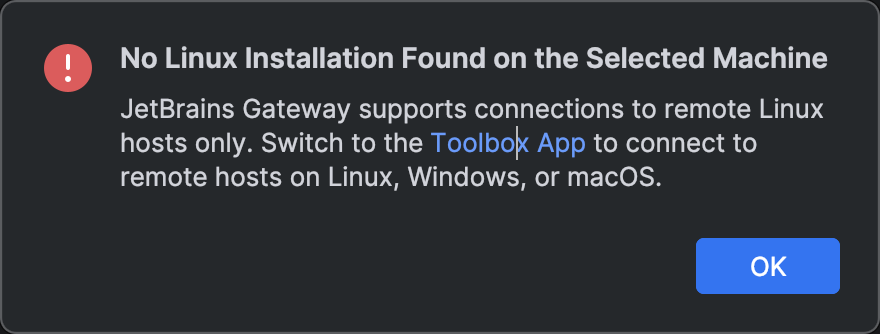
- intellj idea 要pro版本才支持完整的remote开发体验
remote上的idea安装在 ~/Application/ 下,用户是ssh用的用户。本地拉不起远端的idea时可以在远端直接开ide看报什么错
解决插件问题导致无法启动
1
2
3
4
5
6
7
8
9
10
11
# find the intellj config dir
find ~/Library/Application\ Support/JetBrains -maxdepth 1 -name "IntelliJIdea*" | head -n 1

# Navigate to the plugin folder
cd "/Users/hl/Library/Application Support/JetBrains/IntelliJIdea2025.3"

# Move the plugins folder to a backup (this disables ALL non-bundled plugins)
mv plugins plugins_backup

# Create a fresh, empty plugins folder
mkdir plugins
vscode:点击左下角 >< ,Connect To Remote Host
- gradle kotlin dsl:
docker
softwareupdate --install-rosetta支持x86 docker
All Rights Reserved.